Guide 6 of 9 · 5 min read
Auto-send: exactly what JobWeave sends and when
Auto-send is off until you turn it on. Here is everything it does when it is on, and every limit around it.
- 01
Off by default
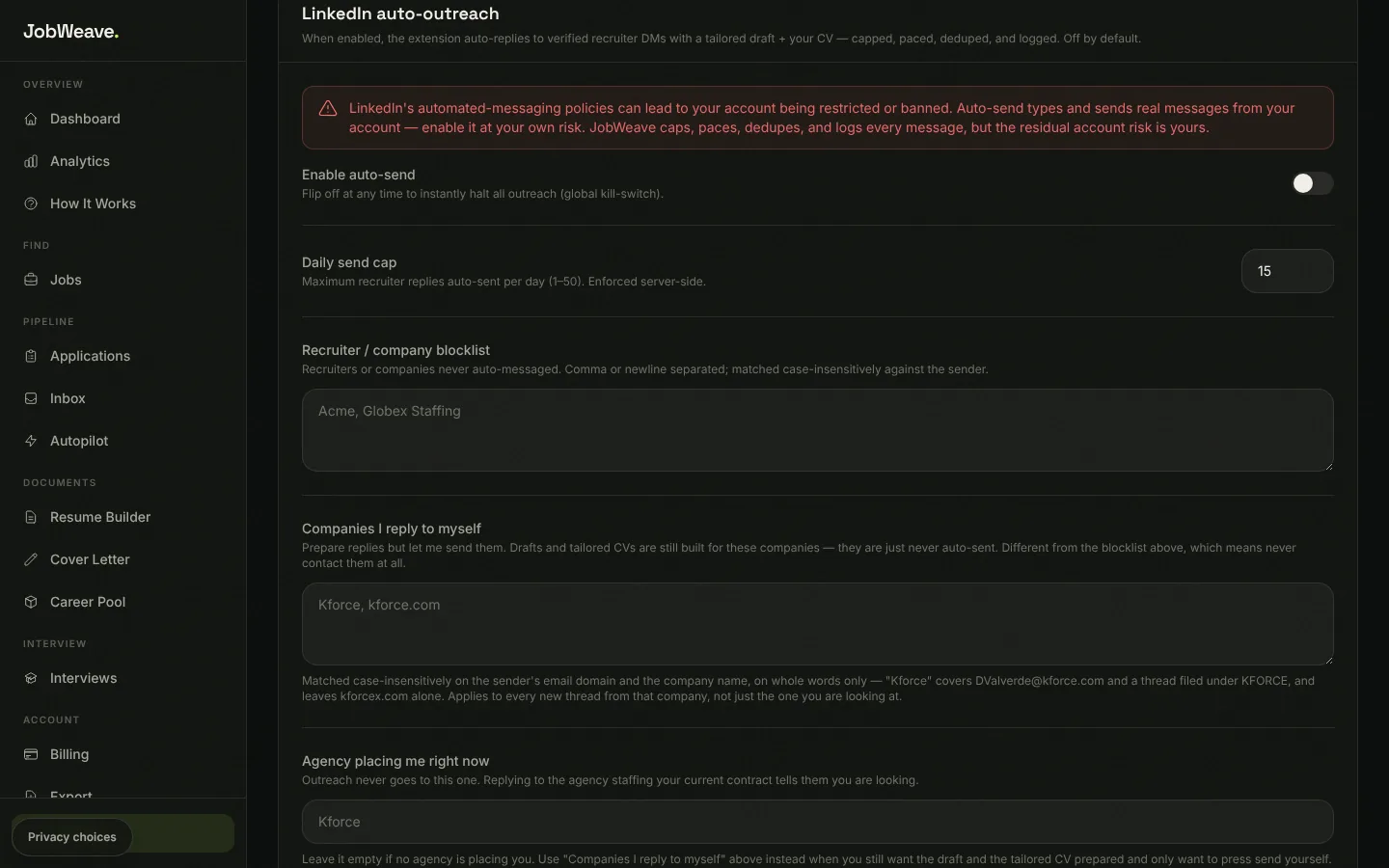
Nothing leaves your accounts on its own unless you turn on Enable auto-send on the Extension page (in the LinkedIn auto-outreach section). The switch is a kill-switch: turning it off stops all automated sending at once.
- 02
What it does when it is on
Email sends are scheduled inside a business-hours window on weekdays, never at 3am. LinkedIn messages are typed at a human pace and checked after sending. Every decision, sent or skipped, is written to the run log on the Outreach tab of your Inbox.
- Replies to recruiter messages on LinkedIn (from the downloaded extension) and in Gmail (once you have granted send access).
- Sends short email follow-ups on recruiter conversations that went quiet.
- Emails a short application with your tailored resume to a fully remote listing posted in the last 14 days that asks for applications by email and scores at or above your auto-tailor threshold: at most 5 per scan, and one per company every 30 days.
- 03
The limits you control
- Daily send cap: 1 to 50 automated messages a day, 15 by default, enforced on the server.
- Recruiter or company blocklist: never contacted, no draft prepared.
- Companies I reply to myself: the draft and resume are prepared, but never sent automatically.
- Agency placing me right now: never contacted, so your current agency never learns you are looking.
- 04
Know the risk
LinkedIn's rules allow it to restrict accounts that send automated messages. JobWeave caps, paces and logs every message, but the remaining risk is yours, which is why auto-send is off until you choose it. The Chrome Web Store version of the extension leaves LinkedIn auto-send out entirely.